
Switching From Legacy Enterprise POS: Aloha and Micros Migrations
By Marcus Rivera · Restaurant Systems Analyst · 9 years experience
July 26, 2026 · 11 min read
Who in your building knows the administrator password to the back-office server?
Ask that question in a restaurant running a legacy enterprise POS and watch what happens. The general manager looks at the owner. The owner looks at the ceiling. Eventually someone says a name — usually a first name, usually a technician from a dealership two towns over, usually followed by "he's been out since March."
That is the shape of the problem. It is not that Aloha and Micros are bad systems; they are not. Both are hospitality-grade platforms with genuinely excellent operational depth, and both have kept high-volume restaurants running through decades of Friday nights, including through internet outages that would stall a cloud-only competitor. The reliability is real and it deserves respect.
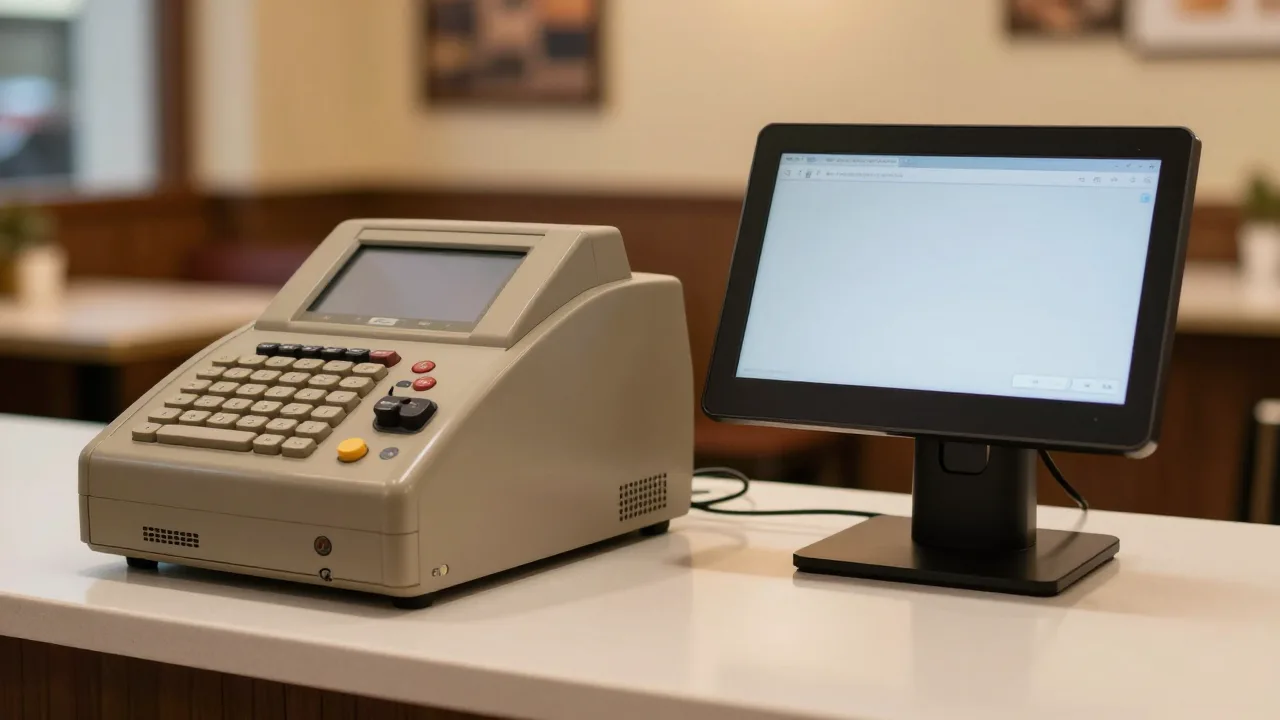
The problem is architectural age and the operating model built around it. These platforms were designed for an era when a restaurant bought a server, bought terminals, and bought a relationship with a local dealer who configured all of it. Every menu change of consequence, every new tax rate, every printer that needed rerouting went through that relationship — often as a scheduled service call at an hourly rate.
Which means the day you decide to leave, you discover that the map of your own operation is not in your building. Your configuration is on a server you cannot log into, your data is in a database you cannot query, and the person who could help you exit is the person whose contract you are ending.
None of that makes the migration impossible. It makes it a different project than switching between two cloud systems, and it needs a different plan. Here is that plan.
What Actually Makes a Legacy Migration Different
Three structural differences drive almost every complication.
| Dimension | Legacy On-Premise | Modern Cloud |
|---|---|---|
| Where data lives | Local database on a back-office server | Vendor-hosted, exportable from a browser |
| Who holds admin access | Often the dealer or VAR | The operator |
| How config changes happen | Service call or dealer ticket | Self-service in the back office |
| Hardware model | Purpose-built terminals, often owned outright | Commodity tablets and browsers |
| Contract counterparty | Frequently a local dealer, not the platform owner | The software vendor directly |
| Documentation | Lives in the dealer's records | Lives in your account |
Read the "who holds admin access" row twice. It is the row that determines your timeline. If you hold your own administrator credentials, a legacy migration compresses toward a normal 6-week project. If you do not, add three to four weeks for the credential and documentation recovery alone.
The One Advantage You Have
Here is something operators overlook: because legacy deployments were sold as capital purchases, you very often own your hardware outright. No lease, no finance company, no return shipment. That is a genuinely better starting position than the typical cloud-vendor operator who is 26 months into a 48-month equipment agreement.
Owning your terminals means the question becomes "can I reuse these" rather than "how do I get out of these," and reuse is often possible. More on that below.
Step One: Establish Who You Are Actually Contracted With
Before anything technical, resolve the commercial picture. Legacy hospitality software is commonly sold and supported through a dealer or value-added reseller network, which means your paperwork may involve two or three entities.
Collect these documents:
- The original purchase or license agreement — what you bought, from whom, and under what license terms
- The current support or maintenance agreement — this is the one with the notice period and the renewal date
- Any payment processing agreement — often separate, often longer, and often the real lock
- Any hardware or software escrow terms — occasionally present in enterprise deals
Then answer one question in writing: whose signature ends my obligation? Support agreements with a dealer typically renew annually with a 30 to 90 day notice window, exactly like the hardware leases we cover in our guide to POS contract termination. Missing the window is expensive and entirely avoidable.
A note on tone, because it matters practically: your dealer is not your adversary. Many are genuinely good operators who have kept your restaurant running for years. Approaching the exit professionally — clear written notice, prompt final payment, a reasonable request for data — gets you cooperation. Approaching it as a fight gets you a slow ticket queue during the exact weeks you need speed.
Step Two: Recover Administrative Access
You cannot document a system you cannot log into. Work this sequence.
- Locate the physical server. It is usually in the office, a closet, or above the ceiling near the office. Note the make, the OS version on the login screen, and whether it has a monitor attached.
- Request credentials in writing from your dealer. Frame it as a business continuity requirement, which it genuinely is. Most will provide them.
- Check the network. Note whether terminals connect by wired Ethernet on a dedicated VLAN, what IP scheme is in use, and whether there is a separate router for the POS network. Your new system may reuse this cabling.
- Inventory the license count. Legacy platforms typically license per terminal. Knowing your entitled count matters if you plan to keep hardware running in parallel.
- Verify your backup actually exists. Many legacy installs have a scheduled local backup that stopped succeeding at some point. Confirm the most recent successful backup date before you touch anything.
If credentials genuinely cannot be recovered, a qualified local IT contractor can usually regain access to a Windows-based back-office machine you own. That is a legitimate path — it is your server and your data — but do it with a professional and document it, rather than improvising.
Step Three: Extract the Data
This is where legacy and cloud diverge most sharply. On a modern platform you click Export. Here you have four realistic options, in descending order of preference.
| Method | How It Works | Effort | Data Quality |
|---|---|---|---|
| Built-in report exports | Run standard reports and export to CSV or Excel | Low | Good for sales, thin for configuration |
| Dealer-generated extract | Request a data pull as a paid service | Low for you, 1-3 weeks elapsed | Usually the most complete |
| Direct database query | An IT contractor queries the local database | Moderate, needs a professional | Complete but needs interpretation |
| Screen documentation | Photograph and transcribe configuration screens | High | The only way to capture some settings |
In practice most restaurants use a combination: reports for sales history, a dealer extract or database query for menu and employee records, and manual screen documentation for the settings that no export contains.
What to Document Manually, No Matter What
Even a complete database extract will not tell you why the system is configured the way it is. Photograph and note:
- Every terminal's screen layout and button positions, screen by screen
- Printer and KDS routing rules per item category
- Job codes, pay rates, and how tip pooling is calculated
- Discount and comp reason codes, and who is authorized for each
- Every scheduled report, its recipients, and its timing
- Tax configuration including any location-specific district rates
- Integration endpoints: accounting, gift cards, delivery marketplaces, loyalty
Budget a full day for this in a busy operation. Two people move faster than one — one photographs, one writes. The output is a binder, physical or digital, that becomes the specification your new vendor builds against. The general mechanics of the transfer are covered in our overview of what POS migration involves, but the documentation burden is genuinely heavier here.
Step Four: Decide What Hardware Survives
Test before you assume. Take one of each device type and try it against your candidate new system.
- Receipt printers. Most kitchen and receipt printers speak standard protocols over Ethernet or USB and are reusable. This is the easiest win — printers are a meaningful share of hardware spend.
- Cash drawers. Almost always reusable, since they trigger off the printer.
- Scanners and scales. Usually reusable if they present as standard USB devices.
- Terminals. The variable one. Many legacy terminals run a full Windows build and can be repurposed by a browser-based POS. Some are locked to their original platform. Test one before deciding for the fleet.
- KDS screens. Frequently just a display plus a small computer. The display almost always survives.
- Payment terminals. Generally do not survive, because they are bound to a processor. Covered separately in our piece on payment processor portability.
- Network cabling. Reuse it. Cat5e or Cat6 runs already pulled through a finished ceiling are worth real money.
A realistic outcome for a four-terminal restaurant: printers, drawers, KDS displays and cabling all survive; terminals are 50/50; payment devices get replaced. That typically converts a $9,000 hardware quote into $2,500 to $4,000. Our restaurant POS hardware guide covers the component-by-component detail.
Step Five: Choose a Replacement That Fits the Operation You Actually Run
Legacy platforms earned their reputation on depth — complex modifier logic, multi-revenue-center handling, granular permission control, offline resilience. If you are a 400-seat operation with three bars and a banquet department, do not assume every lightweight cloud POS covers that ground. Some do; some do not.
Evaluate honestly against the binder you built in step three. The functions to test hardest:
- Offline behavior. Can the terminal take orders and payments with the internet down? For how long? What syncs when it returns? This is where legacy systems set a high bar, and it is a fair bar to hold a replacement to.
- Modifier and combo depth. Ring your five most complicated dishes during the demo. Not their demo menu — yours.
- Revenue center and check handling. Bar-to-table transfers, seat-level ordering, course firing, split checks by seat and by item.
- Permission granularity. Can you replicate your comp and void authorization structure exactly?
- Reporting parity. Take your five most-used legacy reports and ask the vendor to produce each one live.
Side-by-side comparisons are a reasonable orientation tool for this stage — for example, published breakdowns comparing KwickPOS against Aloha on restaurant workflows and KwickOS against Micros on operational features. Treat them as a starting checklist rather than a verdict, then verify each claim in a live demo with your own menu. Our guide to evaluating POS demos effectively covers how to structure that session, and the vendor comparison framework gives you a scoring sheet.
A Realistic Timeline
| Phase | Duration | What Makes It Longer Than a Cloud Switch |
|---|---|---|
| Contract and access recovery | 2-3 weeks | Dealer coordination, credential recovery |
| Documentation and extraction | 2-3 weeks | Manual screen capture, database work |
| Vendor selection | 2 weeks | Deeper feature verification required |
| Build and configuration | 2 weeks | Comparable to cloud |
| Training | 1-2 weeks | Longer if staff have used one system for a decade |
| Parallel run and cutover | 1 week | Comparable to cloud |
| Total | 10-13 weeks |
One frequently underestimated line: training. Staff who have used the same terminal layout for eight years have muscle memory, and muscle memory resists replacement more stubbornly than ignorance does. Add 30 to 40 percent to your training hours relative to a team that switched systems recently.
After Cutover: What to Keep and For How Long
Do not decommission the old server on go-live day. Keep it powered, networked, and accessible for at least 90 days — longer than the 30 days that suffices for a cloud switch, because your historical data is on that machine and nowhere else.
Before anyone reimages or disposes of it:
- Take a full disk image and store it off-site
- Have your accountant confirm a complete fiscal cycle of reporting is reproducible from your exports
- Pull any report you run annually — year-end tax summaries especially
- Wipe or physically destroy any drive that touched cardholder data before disposal
Restaurants that skip the disk image are the ones calling a data recovery service in February for a number they needed in January. It costs almost nothing to take the image and it ends that entire category of risk.
Frequently Asked Questions
How is migrating off a legacy on-premise POS different from switching between cloud systems?
Two things change fundamentally. Your data lives in a local database on a back-of-house server rather than in a vendor portal, so extraction usually involves your dealer or a database professional. And your configuration knowledge often lives with that dealer rather than in your building, so documenting the current setup takes days rather than hours. Both are solvable; both need to be scheduled.
Who is my Aloha or Micros contract actually with?
Frequently a local dealer or value-added reseller rather than the platform owner directly. That dealer typically holds your support agreement, often holds administrative credentials, and may hold the software licenses. Identify the contracting entity before you plan an exit, because your notice obligations and renewal dates live in that agreement rather than in anything from the platform vendor.
Can I reuse my existing terminals and printers?
Printers, cash drawers and scanners are usually reusable because they speak standard protocols. Purpose-built POS terminals are more variable: many run a full Windows build and can be repurposed by a browser-based system, while some are locked to their original platform. Test one unit against your candidate system before assuming anything about the whole fleet. Network cabling almost always survives and is worth real money.
How long does a legacy POS migration take?
Plan 10 to 13 weeks for a single location, roughly double a cloud-to-cloud switch. The extra time goes into documenting an undocumented configuration, extracting data from a local database, and coordinating with a dealer whose schedule you do not control. Multi-location groups should pilot one store fully before scheduling the rest.
Should I keep my legacy system running after cutover?
Keep the back-office server powered and accessible for at least 90 days, longer than the 30 days typical for a cloud switch. You will need it for historical lookups, tax questions and reports you did not realize you relied on. Take a full disk image before anyone reimages that machine, and do not dispose of it until your accountant confirms a complete fiscal cycle is reproducible from your exports.
Start Your Free Trial — No Credit Card Needed
KwickOS runs in a browser on hardware you already own, with self-service menu control so no configuration change ever needs a service call.
Start Free Trial →Related reading: What Is POS Migration? · POS Switching Vendor Comparison · Restaurant POS Hardware Guide · SwitchYourPOS Home